Add parameters to a Youtube URL using ? before the first parameter and & between the subsequent parameters.
eg. http://www.youtube.com/watch?v=ABCDEFGHIJK&list=LMNOPQRSTUVWXYZ
The following list of parameters has been collected from multiple sources. Youtube does not officially document all parameters.
| /watch?v=[VIDEO_ID] | |
displays as a standard Youtube page and specifies the [VIDEO_ID]. This id contains an 11-character value that YouTube uses to uniquely identify a video. The video ID for a video is in the URL of the web page published on Youtube. |
| /embed/[VIDEO_ID] | |
displays as a full screen page suitable for embedding in an iframe and specifies the VIDEO_ID. |
list=[LIST_ID]
listType=[playlist search user_uploads] | |
The list and listType parameters are used together to identify the content to be loaded as follows:
- If the value of listType is playlist, the list parameter specifies the ID of a YouTube playlist. If you specify a video ID that is not in the playlist, the second video of the playlist will be played next, except if an index is given.
- If the value of parameter is listType search, list the value of the parameter specifies the search query.
- If the value of parameter is user_uploads listType, the value of the parameter list identifies the YouTube channel whose uploaded videos will be uploaded.
Note: If the list and listType parameters are specified, it is not necessary to specify a video ID.
|
| index=[INDEX_NO] | |
specifies index of the played video in the playlist. Usually causes the video with index+1 getting played next, but there are some special cases when removing videos from the playlist overview on the side or modifying the playlist in other ways while it's being played. (implies list=) |
| vq=[vqcode] | |
sets the vertical resolution where [vqcode] is:
| hd1080 | 1080p |
| hd720 | 720p |
| large | 480 |
| medium | 360 |
| small | 240 |
Note: If a video is not encoded at the requested resolution, the nearest available resolution will be used.
|
| fmt= | |
The fmt parameter specifies the return format for the video resolution without using the Youtube player interface.
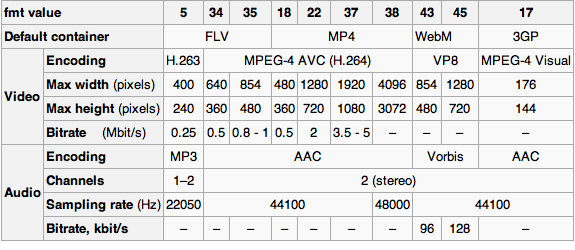
Note: Video bitrate is approximate - may be higher or lower due to variable encoding rate
|
|
| start= | |
The start parameter specifies the number of seconds into the video to start play.
eg. http://www.youtube.com/watch?v=ABCDEFGHIJK&start=21 |
| end= | |
The end parameter specifies the number of seconds into the video to end play. Can be used with or without a start parameter but only works with an embed link.
eg. http://www.youtube.com/embed/ABCDEFGHIJK&end=43 |
| hl= | |
Sets the language. Values include:
| zh-TW | Chinese (Traditional) |
| cs-CZ | Czech |
| nl-NL | Dutch |
| en-GB | English (Great Britain, Ireland, Australia and New Zealand) |
| en-US | English (United States and Canada)* default value |
| fr-FR | French |
| de-DE | German |
| it-IT | Italian |
| ja-JP | Japanese |
| ko-KR | Korean |
| pl-PL | Polish |
| pt-BR | Portuguese (Brazil) |
| ru-RU | Russian |
| es-ES | Spanish (Spain) |
| es-MX | Spanish (Mexico) |
| sv-SE | Swedish |
|
| gclid= | |
This parameter is used in auto-tagging for Google Ad Words and will show up in the landing page URL when a user arrives at the page from the ad. |
| feature= | |
The feature parameter is assigned within Youtube to describe certain videos and how to display. Values include:
| watch_response | Any videos in response to a video will have this parameter linked to it. (assigned within Youtube) |
| watch_response_rev | The reverse of the above. The "child" video page will have a link to the "parent" page (assigned within Youtube) |
| pyv | Promoted Youtube Video (pyv) on a watch page or on a channel page (must be entered within Google AdWords Editor destination url) |
Other possible values include: recent_shows, recentu, recentlik, spotlight, related, channel, branded, aso, sub, fvw, fvwk, fvhl, BF, topvideos, more_related, list_related, player_embedded, artistob, youtu.be |
| ad= | |
Advertisement ID assigned to a Youtube advertisement |
| kw= | |
The kw parameter is an indication of keyword insertion. Keyword insertion is an advanced feature that can help make an ad more relevant to a diverse audience. Each time the ad shows, AdWords will automatically replace the code with the keyword that triggered the ad. (must be entered within Google AdWords Editor destination url) |
| videos= | |
|
| force_ap= | |
|
| &stereo= | |
to define if you want to hear the video in stereo (1) or in mono (0). |
| channel=CHANNEL_ID | |
Use with a live channel URL. The CHANNEL_ID value is the ID of the channel owner. |
| rel=0 | |
Limit the suggested videos shown at the end to those from the same channel as the video that was just played. |
| controls=[0 1 2] | |
The default value is 1. Set to 0 to disable controls. |
| showinfo=0 | |
Hides the title - now deprecated as of 25-Sep-2018 |
| modestbranding=1 | |
Hide the YouTube logo in the control bar - now deprecated |
| autoplay=1 | |
Video will automatically start playing |
| loop=1 | |
If used with a single video ID, the video will replay once finished. If used with a playlist, the entire playlist will replay once the last video has finished. |
| shuffle=1 | |
Shuffle the playlist. (implies list=) |
| playnext=[1 or 0] | |
play the next video in the playlist. (implies list=) |
| playnext_from=[nn] | |
play the next video in the playlist starting from [nn] seconds. (implies list=) |
| autohide=[0 1 2] | |
sets whether controls are automatically hidden video when playback begins.
0 = video progress bar and video player controls are visible for all playback and full screen.
1 = progress bar and player controls disappear a few seconds after the video starts playing. To display again, move mouse over player or press a key.
2 = progress bar and player controls disappear immediately. |
| cc_load_policy=1 | |
closed captioning is displayed by default, even if the user has disabled subtitles. Default value is based on user preferences. |
| color= | |
specifies the color used on the player progress bar. Valid values are red (default) and white. Note: Setting the color parameter disables white modestbranding option. (embed links only) |
| disablekb=[0 1] | |
The default value is 0. Set the value to 1 to disable keyboard control of the player. The keyboard controls are as follows: Spacebar: play / pause. Left arrow: back 10% in the current video. Right arrow: move 10% in the current video. Up arrow: allows increase the volume. Down arrow: lets down the volume. |
| enablejsapi=[0 1] | |
The default value is 0. Setting this parameter to 1 enables the JavaScript API. For more information on the JavaScript API and how to use it, see the documentation for the JavaScript API. |
| fs=[0 1] | |
The default is 1, which makes the full screen button appears. Setting this parameter to 0 prevents the full screen button being displayed. |
| iv_load_policy=[1 3] | |
The default value is 1 which enables display of video annotations, while value 3 disables video annotations. |
| origin= | |
This parameter delivers an additional security measure for the IFrame API and is compatible only with IFrame additions. If you are using IFrame API, which means that you set the value of enablejsapi parameter to 1, you should always specify your domain as the value parameter of origin. |
| playerapiid= | |
The value can be an alphanumeric unit. These settings are used by the JavaScript API. Consult the documentation for the JavaScript API for more details. |